
Worried about your child, spouse, or employee? We rank and review the top 5 monitoring apps for iPhone 17 – all working without jailbreak. From live screen recording to location tracking, find the perfect tool to get the answers you need. Read on to choose the best one for your situation.
Real-life concerns that brought you here
Every day, we receive desperate messages from people just like you:
“I want to use my phone to check the messages received on my daughter’s iPhone 17. She has been going out frequently lately, and I need to know what she did and who she was with.” – From a concerned MUM
“How can I spy on my son’s iPhone 17 without him knowing? I don’t blame him for wanting privacy, but I worry his heart will be broken. He always locks himself in his bedroom. I’m upset about his condition. To make him happy, I bought this expensive phone for him last week.” – Angela
“Please help. I need software to secretly put on my husband’s iPhone 17 to see what he is doing recently. I doubt the truth of many things. I need to make sure my marriage is safe.” – Sarah
“We have seven dedicated outside sales reps. After noticing a steady decline in sales for five months, we installed monitoring software. On the very first day, we tracked all six reps to a restaurant 5 minutes away. Thank you – you helped us identify our problem immediately!” – Gary, Business Owner
Whether you are a worried parent, a suspicious spouse, or a diligent employer, monitoring an iPhone 17 without jailbreaking it has never been easier. You do not need physical access to the device for long, and you certainly do not need to void the warranty by jailbreaking.
Here is the ultimate guide to the 5 best monitoring apps for iPhone 17 – all tested, ranked, and reviewed for their unique capabilities.
The 5 Best Monitoring Apps for iPhone 17 (Ranked)
1. mSpy – Best Overall & Most Feature-Rich
Key Features for iPhone 17 Monitoring:
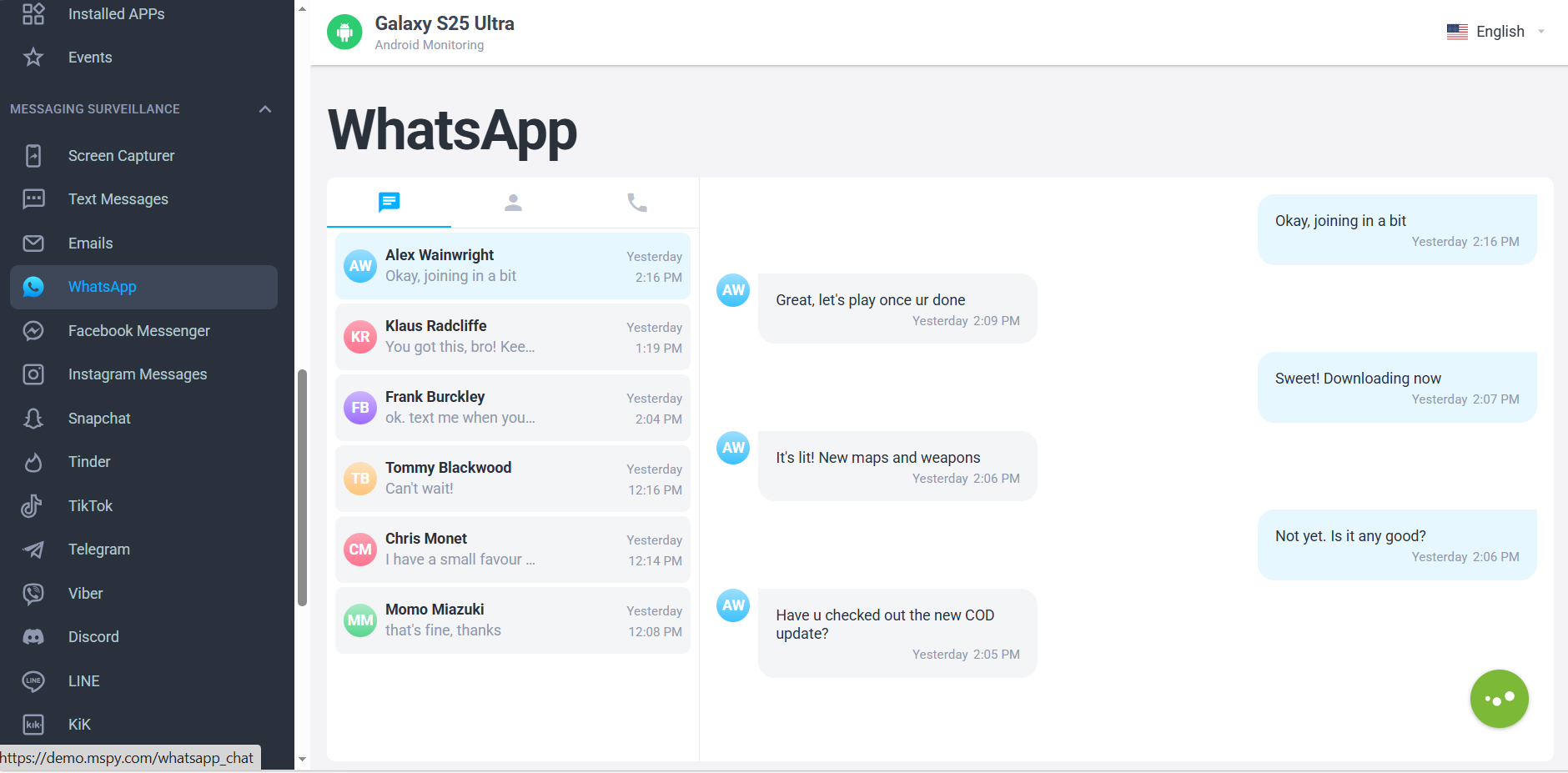
- Live Screen Recording – Capture and watch everything happening on the iPhone 17 screen in real-time.
- 30+ IM Apps Tracking – Monitors WhatsApp, Snapchat, WeChat, Instagram DMs, and Tinder – even deleted messages.
- Real-time Audio & Video Telecast – Remotely listen to the phone’s surroundings.
- Location Alerts – Set up geo-fencing; get notified the moment the iPhone 17 leaves a designated safe zone.
- 100% Invisible Mode – Runs completely hidden; it does not appear under applications on the home screen.
- Works without Jailbreak via iCloud Sync, or with advanced features if jailbroken.
2. Eyezy – Best for AI-Powered Social Insights
Key Features for iPhone 17 Monitoring:
- Social Spotlight – Uses AI to analyze conversations and flag suspicious or concerning words (e.g., “secret,” “meet,” “love”).
- Keylogger – Records every keystroke typed on the iPhone 17, including passwords and deleted drafts.
- Pinpoint Location – Tracks real-time GPS and provides location history with street-level detail.
- Magic Alerts – Receive instant notifications when the target phone connects to specific Wi-Fi networks or enters specific addresses.
3. Parentaler – Best for Parental Controls & Screen Time
Key Features for iPhone 17 Monitoring:
- Comprehensive Screen Time Management – Remotely set daily usage limits for specific apps and block access during bedtime.
- App Blocking – Instantly block inappropriate apps or games on the iPhone 17 with a single click.
- Location History & Geofencing – View where your child has been over the past 30 days.
- Remote Settings Lock – Lock the target iPhone 17 remotely to enforce digital detox during study or dinner time.
4. Spynger – Best for Catching a Cheating Partner
Key Features for iPhone 17 Monitoring:
- Ambient Recording – Secretly activates the iPhone 17’s microphone to record surrounding voices and conversations.
- Call Logs & Contacts – View complete call history with timestamps, durations, and contact details, even deleted logs.
- Photo & Video Access – Browse all media stored on the iPhone 17’s gallery without leaving a trace.
- Browser History Tracker – See every website visited, including incognito mode attempts (via keylogging).
5. Famisafe – Best for Digital Habits & Web Filtering
Key Features for iPhone 17 Monitoring:
- Smart Web Filtering – Automatically blocks adult, gambling, or violent content on Safari and other browsers.
- Activity Reports – Generates daily or weekly PDF reports showing exactly how the iPhone 17 was used (most-used apps, screen unlocks).
- Real-Time GPS Tracking – Displays the precise location on a live map with 3D street view.
- App Usage Analytics – See how long the user spends on TikTok, YouTube, or Instagram every single day.
Why Choose mSpy for iPhone 17? (Deep Dive)
While all 5 apps are excellent, mSpy consistently ranks as the #1 choice for iPhone 17 monitoring because it offers features others simply cannot match:
- Monitors more Instant Messengers than any other iPhone 17 spy app (including Signal and Telegram).
- First-ever iOS viewer app – Read your tracking data on the move via your own phone.
- Spy on calls, texts, and screen – Capture stickers and pictures that other spyware cannot read.
- Live location tracking – Compatible with iPhone 17, 17 Pro, 17 Plus, and 17 Pro Max.
- View contact info, times, dates, and durations of every call instantly.
- One-click website history – See all visited URLs with timestamps.
- Keyword & location alerts – Get email or SMS alerts when specific words are typed or when the phone moves.
- Unlimited device changes during your subscription period.
Pricing Plans (mSpy)
- 1 Month – $48.99/mo
- 3 Months – $28.00/mo
- 12 Months – $11.67/mo (Best value)
How to Monitor an iPhone 17 – Two Simple Methods
Method 1: Without Jailbreak (iCloud Sync) – Recommended
Important: If other software tells you that you can monitor an iPhone 17 without installing anything, it is likely dangerous. Please do not install or try unverified software. mSpy is safe and trusted by millions.
- Sign in to your mSpy dashboard on any browser.
- Enter the iCloud credentials (Apple ID & password) of the target iPhone 17.
- If two-factor authentication (2FA) is enabled, enter the verification code sent to the target phone.
- Access all synced data (messages, photos, locations) remotely from your device.
Heads up: An email notification is sent to the Apple ID owner upon sync – ensure you have permission or physical access.
Method 2: With Jailbreak (Full Advanced Features)
- Jailbreak the iPhone 17 (requires physical access).
- Log in to your mSpy account and click “Get Started”.
- Follow the on-screen instructions to install the monitoring profile.
- Gain access to advanced features like live screen recording and ambient listening.
Frequently Asked Questions
Q: How can I get a refund?
A: mSpy offers a reliable refund policy. If you are unsatisfied, contact their 24/7 live chat support within the refund window to process your request quickly.
Q: Will the user know the app is installed?
A: No. The spyware uses the latest stealth technology. It does not show up under Applications on the screen, making it invisible to tech-savvy kids or partners.
Q: Is the spy app installed on the SIM card?
A: No. Our iPhone 17 monitoring app is installed in the phone’s internal memory and works independently of the SIM card.
Q: Can I install or uninstall the monitoring software remotely?
A: Sorry, remote installation is not possible. The app must be manually installed on the target device. However, you can deactivate it remotely by sending a “Stop Monitoring” command from the dashboard.
Q: Is it legal to use mSpy to track my wife/husband?
A: It is perfectly legal to use monitoring software on devices you own or with explicit consent from the user. Always check your local laws regarding employee monitoring and spouse tracking.
Final Verdict
If you need to monitor an iPhone 17 without jailbreak, mSpy is your safest, most powerful bet. For parents, Parentaler and Famisafe offer incredible screen-time regulation. For partners seeking the truth, Spynger and Eyezy provide hard, undeniable evidence.
Take the first step today. Choose the app that fits your needs, install it in minutes, and gain the peace of mind you deserve – all without touching the phone’s jailbreak status.



No responses yet